Skillgine Copilot Execution Add-On for Consultants
Microsoft Office Productivity Solutions

Your Consulting Framework Is Valuable. Now Make It AI-Ready.
Help your clients turn training into action inside of the Microsoft tools they already use.
Businesses are no longer asking, “Should we use AI?” They are asking, “Who can help us use AI properly inside our work?”
Microsoft reported that Microsoft 365 Copilot reached over 30 million paid seats in fiscal year 2026, and Azure surpassed $100 billion in annual revenue, showing that enterprise AI is moving from experiment to business infrastructure.
At the same time, the 2024 Work Trend Index Annual Report from Microsoft and LinkedIn found that 75% of global knowledge workers use AI at work, 79% of leaders agree their company needs AI to stay competitive, and 60% worry their organization lacks a plan and vision to implement AI.
That gap is your opportunity.
If you are a consultant, coach, trainer, advisor, or facilitator, your clients already trust your ideas. But now they need more than ideas. They need execution. They need prompts, workflows, templates, and AI-powered tools that help their teams apply your framework every day.
That is where the Skillgine Copilot Execution Add-On fits
THE PRoblem Consultants Face
The Market Has Shifted: AI Skills Are Becoming a Buying Requirement
Your clients are under pressure. Their teams are overwhelmed by emails, meetings, reports, documents, follow-ups, and manual work. AI is no longer a “nice to have.” It is becoming a core workplace skill.
The 2024 Work Trend Index Annual Report from Microsoft and LinkedIn found that 66% of leaders say they would not hire someone without AI skills, and 71% say they would rather hire a less experienced candidate with AI skills than a more experienced candidate without them.
This is a major signal for consultants.
It means businesses are no longer only buying expertise. They are buying AI-enabled execution. They want advisors who can help their teams apply strategy faster, create better outputs, and use AI safely inside daily work.
If your consulting offer does not include an AI execution layer, clients may start seeing it as incomplete.

The Consultant Opportunity
Turn AI Demand Into New Revenue
The AI market is creating a new revenue path for consultants.
Your clients do not necessarily need another generic AI course. They need someone who understands their business goals, their people, and their workflows. That is where consultants have a major advantage.
With the Skillgine Copilot Execution Add-On, consultants can turn their existing frameworks into:
- Copilot prompt libraries
- Client-ready workflow templates
- Meeting and follow-up systems
- Strategy execution tools
- Leadership communication drafts
- Sales follow-up emails
- Policy and process templates
- AI-assisted coaching guides
- Custom Copilot AI agents for repeatable tasks
Skillgine’s internal consultant training materials already describe this offer as helping consultants add Microsoft Copilot workflows, prompts, worksheets, and practical exercises to existing training programmes so clients can turn leadership, sales, communication, and strategy concepts into real business outputs.
This is not technical AI training. It is a practical business execution add-on that helps consultants keep their core expertise while adding modern Copilot-powered delivery.
Who This Add-On Is For
Built for Consultants Who Want Their Work to Drive Real Adoption
This add-on is ideal for consultants, advisors, coaches, and implementation partners who want their work to be used more consistently by clients.
It is especially useful for:
- Business consultants
- Management consultants
- Operations consultants
- HR consultants
- Marketing consultants
- Sales consultants
- Leadership coaches
- EOS, Scaling Up, or business operating system advisors
- Digital transformation consultants
- Change management consultants
- Productivity consultants
- AI consultants
- Fractional executives
- MSPs and Microsoft 365 advisors
- Training companies
- Industry specialists
If your consulting work includes frameworks, policies, templates, playbooks, systems, or repeatable processes, this add-on can help your clients apply that work through Microsoft Copilot.
Why Consultants Need to Act Now
The consulting market is changing quickly.

Clients are becoming more practical. They no longer want training that ends with a binder, slide deck, or theory session. They want training that creates real assets their team can use the next day.
The Harvard Business Publishing Corporate Learning and Degreed study surveyed 2,739 employees and found that employees who engage with Gen AI more often tend to prefer hands-on, self-directed, and continuous learning over traditional structured training. It also found that 60% of respondents prefer learning about Gen AI in short, ad hoc bursts.
That matters because many traditional consulting and training programmes are still built around long workshops, slide-heavy sessions, and general advice.
The future is different.
Clients need short, practical, workflow-based learning that helps them use AI in the flow of work. Consultants who can add this execution layer will become more relevant, more valuable, and harder to replace.
The Revenue Protection Problem
Your Framework Could Be Copied, But Execution Builds Loyalty

AI makes information easier to access. Clients can ask ChatGPT or Copilot to explain leadership models, sales frameworks, communication strategies, HR policies, and business planning concepts.
That does not mean consultants are no longer needed. It means consultants must move higher up the value chain.
Your future value is not just what you know. It is how you help clients apply what you know.
The Harvard Business Publishing Corporate Learning report states that companies investing in structured Gen AI education and integration are separating themselves from competitors, and that the differentiator is the ability to scale Gen AI across functions to drive business results through improved processes and efficiency.
For consultants, this means your offer should not stop at “Here is the framework.”
It should become:
“Here is the framework, and here is the Copilot-powered system your team will use to apply it every week.”
That protects your revenue because you become part of the client’s execution system, not just a one-time trainer.
What Consultants Can Package
What Skillgine Helps Consultants Build
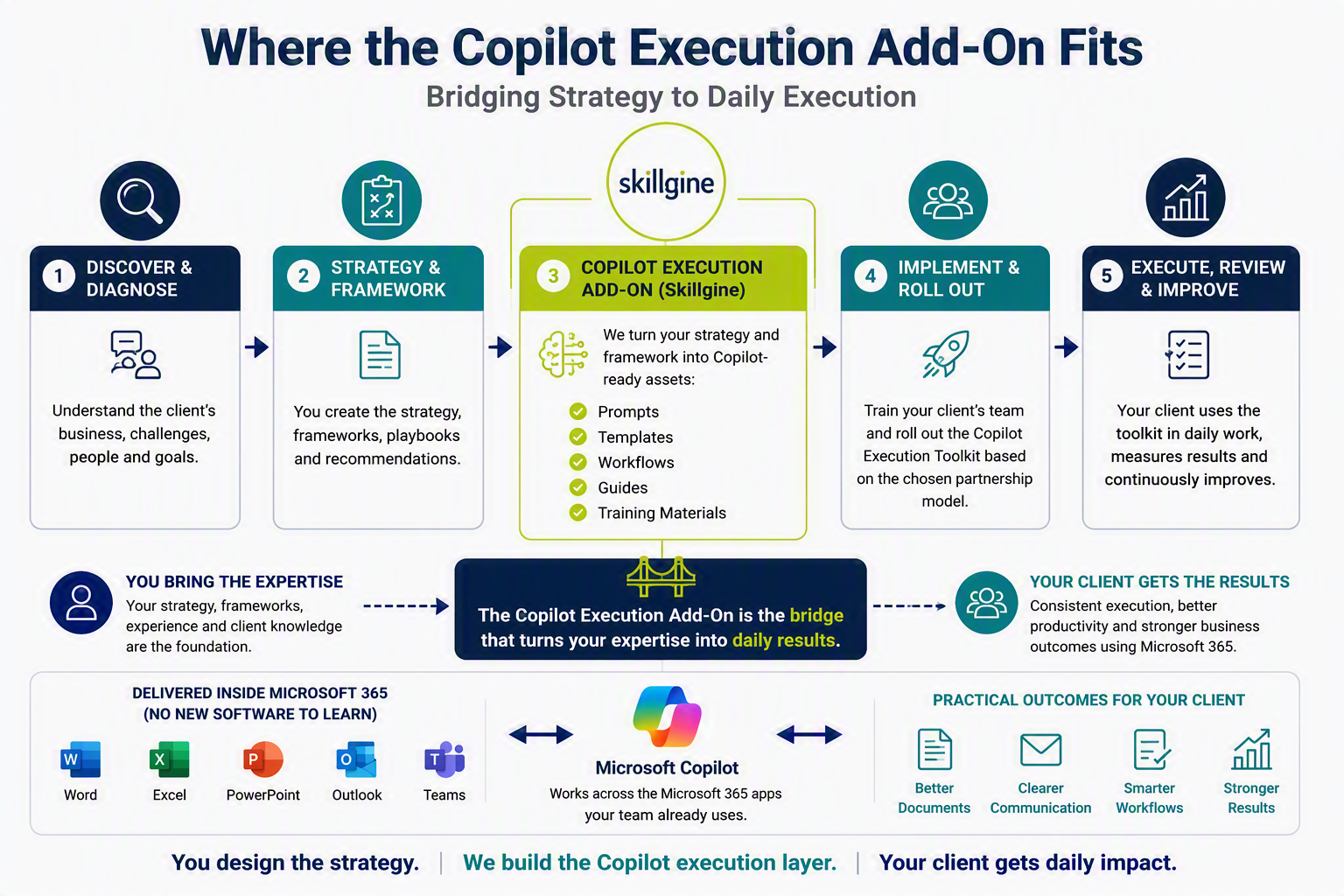
Skillgine helps consultants turn their strategy, policies, frameworks, and templates into Copilot prompts, workflows, training assets, and AI agents your clients can use inside Microsoft 365. Depending on your partnership model, Skillgine can help you build:
Copilot Prompt Libraries
Custom Copilot AI Agents
AI agents for repeatable business tasks such as intake questions, follow-up planning, meeting preparation, client onboarding, policy guidance, or training reinforcement.
Copilot Workflow Templates
Copilot Training Assets
Copilot-Branded Toolkits
Reusable assets so your reports, templates, and client deliverables look professional and consistent.
Optional Client Rollout Support
Based on the partnership model, Skillgine can help train your clients’ team and roll out the Copilot execution toolkit.
Benefits for Clients
Why Microsoft Copilot Is the Right Platform for Business Clients

Many businesses are already using Microsoft 365. That makes Microsoft Copilot a practical AI choice because it connects to the tools teams already use for documents, emails, meetings, spreadsheets, presentations, and collaboration.
Microsoft’s adoption resources describe Microsoft 365 Copilot as embedding AI into daily workflows and turning organizational data into actions and insights across Microsoft 365 apps.
For consultants, this matters because clients do not need to change platforms, move their teams to unfamiliar tools, or create another disconnected system. The execution layer happens where work already happens.
That makes your consulting easier to apply, easier to adopt, and easier to scale.
HOW IT WORKS
From Consulting Framework to Copilot Workflow
Step 1: Capture the Consultant’s Framework
We begin with the consultant’s existing materials, such as:
- Strategy documents
- Consulting frameworks
- Client playbooks
- Policies
- Templates
- SOPs
- Training materials
- Proposal formats
- Discovery tools
- Assessment forms
- Reporting structures
- Implementation plans
Step 2: Organize the Framework for Copilot Use
Skillgine helps structure the content so Copilot can support daily work more clearly.
This may include:
- Approved writing structure
- Standard document formats
- Role-based prompts
- Department-specific templates
- Review rules
- Tone and brand guidance
- Compliance instructions
- Decision checklists
- Management approval steps
Step 3: Build Copilot Execution Prompts and Templates
The consultant’s system is converted into practical prompts, templates, and workflows that help client teams create documents using the approved framework.
Step 4: Train the Client Team
Skillgine can help train the client’s team to use Copilot with the consultant-approved structure.
Step 5: Support Review and Improvement
The consultant can continue to improve the framework as the client’s business changes.
Ready to Turn Your Framework Into a Copilot Execution System?
Partner with Skillgine to create a Copilot Execution Add-On for your consulting practice.
Partnership Models
Flexible Support for Consultants and Clients
Skillgine can support consultants in different ways depending on their business model
Option 1: Behind-the-Scenes Support
Option 2: Co-Branded Delivery
Option 3: White-Label Support
The consultant uses Skillgine’s support in the background while presenting the solution under their own brand.
Option 4: Client Training Support
Option 5: Ongoing Implementation Support
Why Skillgine
Practical Copilot Training and Implementation Support
Skillgine focuses on helping businesses use Microsoft Copilot in practical, structured, and business-focused ways.
We help consultants turn their expertise into usable Copilot workflows, templates, prompts, and training systems.
Skillgine brings:
- Microsoft Copilot training experience
- Practical business adoption focus
- Clear templates and frameworks
- Support for non-technical users
- Microsoft 365 workplace knowledge
- Training structure for teams
- Strategy-to-execution thinking
- Support for consultants, coaches, and advisors
We understand that Copilot should not be used randomly.
It works best when it follows a clear strategy, policy, and business framework.
That is where consultants add major value.
The Bottom Line
The Next Consulting Advantage Is Execution
The old consulting model was simple:
Train the client. Inspire the team. Leave the slides behind.
The new model is different:
Train the client. Build the workflows. Create the prompts. Deploy the AI agent. Help the team execute.
That is the future consulting opportunity.
Microsoft Copilot’s growth shows that businesses are investing heavily in AI. The 2024 Work Trend Index Annual Report from Microsoft and LinkedIn shows that AI skills are already changing hiring expectations and workplace competitiveness. The Harvard Business Publishing Corporate Learning research shows employees need practical, continuous, hands-on Gen AI learning to build fluency.
Consultants who act now can turn this shift into new sales growth, stronger client retention, and future revenue protection.
Consultants who wait may find their clients looking for someone else who can connect strategy to AI-powered execution.

Add Copilot Execution to Your Consulting Offer
You do not need to become a technical AI trainer.
You keep your framework.
Skillgine adds the Copilot prompts, workflows, toolkits, and AI agents.
Your clients get faster execution.
Book a Copilot Execution Add-On strategy call with Skillgine and discover how your consulting programme can become AI-ready.
Frequently Asked Questions (F.A.Q)
What is the Copilot Execution Add-On for Consultants?
It is a service that helps consultants turn their strategy, policy, process, templates, and frameworks into Microsoft Copilot-ready workflows clients can use in daily work.
Does Copilot replace the consultant?
No. Copilot does not replace the consultant’s thinking, expertise, judgement, or strategy. The consultant designs the framework. Copilot helps apply it consistently.
How does this help consultants?
It helps consultants protect the value of their work, improve client execution, create repeatable tools, and offer a practical AI adoption add-on.
How does this help clients?
Clients can use Copilot to create work documents that follow the consultant’s approved strategy, policy, structure, and templates.
What kind of documents can Copilot help create?
According to the Consultant's strategy and framework, Copilot can assist in creating a variety of business documents, including reports, proposals, emails, meeting summaries, action plans, policies, standard operating procedures (SOPs), leadership updates, marketing content, and more.
How do we make sure Copilot does not make things up?
The consultant first defines the strategy, policy, framework, templates, and review rules. Copilot then follows that approved structure when helping staff create work documents. Human review and management approval remain part of the process.
Can this be white-labelled for consultants?
Yes. The add-on can be structured as behind-the-scenes support, co-branded delivery, or white-label support depending on the consultant’s business model.
Is this only for AI consultants?
No. It is useful for many types of consultants, including business, operations, HR, marketing, sales, leadership, productivity, and management consultants.


Skillgine provides Microsoft Copilot training and implementation services to businesses across Canada and the United States. We help organizations assess AI readiness, train employees, design practical workflows, develop Copilot agents, connect business applications and support long-term Copilot adoption.
COPILOT TRAINING
Copilot Training for Businesses
Copilot Training for Solopreneurs
Copilot Training for Office Professionals
Copilot Training for Non-Profits
Startup Bootcamps
Role-Based Copilot Training (Coming Soon)
Train-the-Trainer Programme (Coming Soon)
READINESS & ADOPTION
Who We Help
Small and Mid-Sized Businesses
Office Professionals
Consultants and Trainers
Non-Profit Organizations
Associations and Member Groups
Colleges and Training Providers
Startups
Sales and Customer Service Teams (Coming Soon)
Executives and Managers ( Coming Soon)
HR Managers ( Coming Soon)
Programmes & Resources
COMMUNITY
Microsoft Copilot Blog
Skillgine Copilot User Group
Copilot Adoption Academy
Skillgine Newsletter
Frequently Asked Questions (F.A.Q)
What Does Skillgine Do?
Skillgine helps organizations implement and adopt Microsoft Copilot. Services include Copilot readiness assessments, practical employee training, workflow design, Copilot implementation, custom Copilot agents, Copilot Studio solutions, MCP setup, Zoho CRM integration and ongoing adoption support.
Does Skillgine Provide Microsoft Copilot Training?
Yes. Skillgine provides practical Microsoft Copilot training for businesses, managers, office professionals, consultants, non-profits and other organizations. Training focuses on using Copilot in daily work across Microsoft 365.
Does Skillgine Integrate Copilot with Business Applications?
Yes. Skillgine provides Copilot integration services for supported business applications, including Zoho CRM. Services can include readiness review, workflow design, agent configuration, permission planning, employee training and adoption support.
What Is Skillgine’s MCP Setup Service?
Skillgine helps organizations plan and configure approved connections between AI agents and selected business systems using Model Context Protocol. The engagement can include business-workflow review, authentication requirements, access permissions, supported actions, approval requirements and user adoption.
Where Does Skillgine Provide Services?
Skillgine provides virtual Microsoft Copilot training, readiness, implementation and integration services to organizations across Canada and the United States.
Speak with a Copilot Specialist
- 1-844-904-8943
- Email Us
- Canada & USA
STAY CURRENT WITH COPILOT


By subscribing, you agree to receive Skillgine news, training updates and event information. You may unsubscribe at any time.

Copyright © 2026 skillgine | Privacy | Terms | Sitemaps | Accessibility | Refund Policy | Partner Terms | AI Ethical Use Policy
Microsoft, Microsoft 365, Microsoft Copilot and related product names are trademarks of the Microsoft group of companies. Skillgine is an independent training, implementation and adoption services provider unless otherwise stated.