
Solopreneur Productivity
Comprehensive self-paced training with step-by-step instruction and real-world workflows to help you confidently use Microsoft 365.
Microsoft Office Productivity Solutions

Your AI-Powered Business Partner
Run your business smarter, faster, and stress-free with Microsoft 365 Copilot.
As a solopreneur, you wear every hat—CEO, marketer, accountant, and customer service rep. Time is your most valuable asset, and every minute counts. Microsoft 365 Copilot is your secret weapon: an AI assistant built into Word, Excel, Outlook, and Teams that helps you automate tasks, create content, and manage your business with ease. But to truly unlock its potential, you need expert guidance—and that’s where we come in.
How Our Training Helps You
Our program is designed for solopreneurs who need practical, time-saving solutions:
- Learn how to use natural language prompts to create professional documents and marketing content.
- Automate repetitive tasks like invoicing, scheduling, and follow-ups.
- Build confidence in using AI for business decisions and client communications.
- Discover integrations with tools like CRM and payment platforms for a seamless workflow
How You’ll Measure Success
- Time Savings: Free up hours each week for revenue-generating activities.
- Professional Output: Deliver polished proposals, reports, and marketing materials without hiring extra help.
- Stress Reduction: Simplify operations and focus on scaling your business.
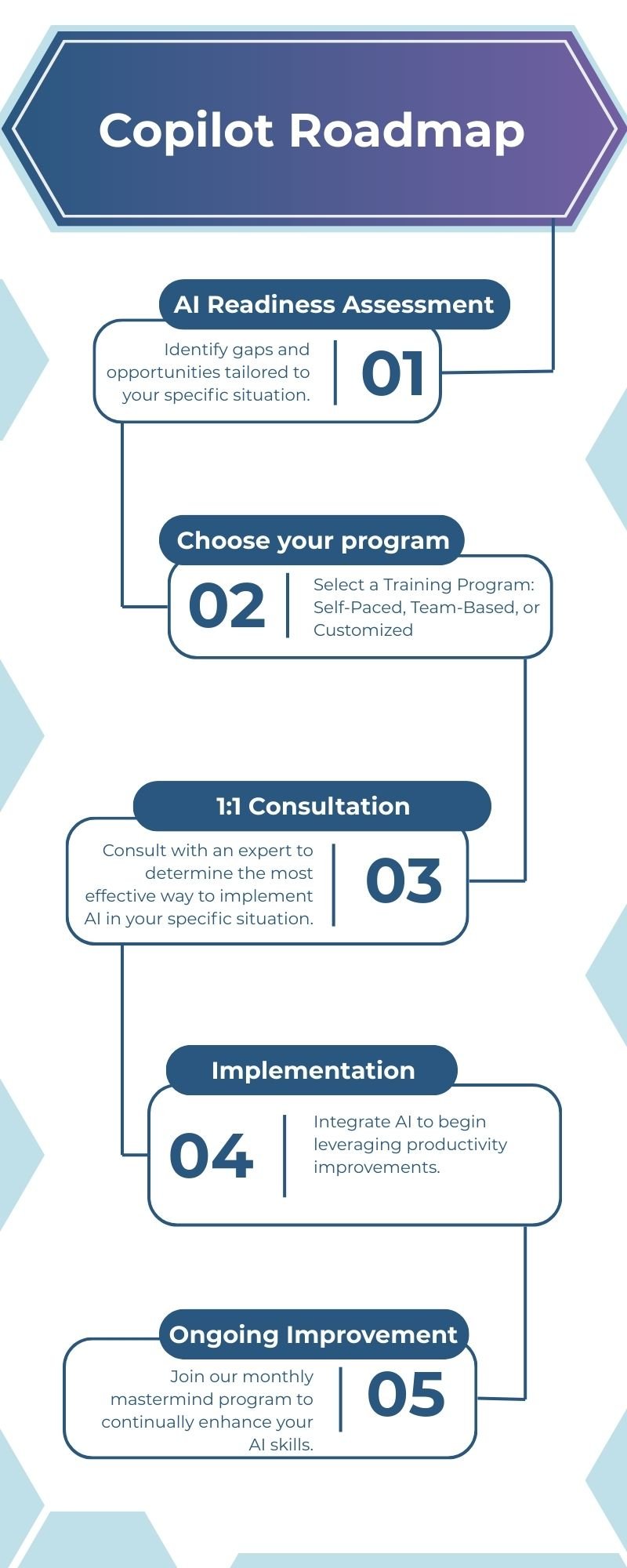
Why Choose Us?
Industry-leading Copilot training with hands-on implementation and ongoing support
Free Business Impact Assessment
Pinpoint your biggest time wasters and tailor the learning journey to align with your industry and business objectives.
Consultation/ Implementation Support
Access consulting and hands-on implementation support as part of the training to drive real, measurable impact.
Ongoing Copilot Updates
Stay informed about monthly Copilot updates to leverage the newest features and automation opportunities.
Training packages & Bundle
Copilot Training
Core Bundle
Copilot + Outlook, Word and Excel- Learn at Your Own Pace
- 60+ minutes videos
- Free Business Impact Analysis
- 30-min Consultation/Implementation Support
- 15-day Email Support
- 30-day Access to the Portal
Download course outline

Foundational
Copilot + Outlook- Learn at Your Own Pace
- 30+ minutes videos
- Free Business Impact Analysis
- 30-min Consultation/Implementation Support
- 15-day Email Support
- 30-day Access to the Portal
Download course outline

Meeting Bundle
Copilot+ Outlook and Teams- Learn at Your Own Pace
- 60+ minutes videos
- Free Business Impact Analysis
- 30-min Consultation/Implementation Support
- 15-day Email Support
- 30-day Access to the Portal
Download course outline

custom team training -plus additional support

Implementing Copilot
Across Departments
Setup, rollout, and workflow integration. Leveraging Copilot to automate tasks and maximize productivity across departments.
Copilot MasterMind
Monthly Program for All Learners
The Mastermind Program is your personal trainer — making sure you show up, build real skills, and get stronger every single month.

Copilot Readiness Assessment
For Executive/Managers
Identify gaps and opportunities tailored to your specific situation.
Frequently Asked Questions (F.A.Q)
What is Microsoft 365 Copilot training, and what will I learn at Skillgine?
Skillgine’s Microsoft 365 Copilot training helps you use Copilot inside the Microsoft apps you already rely on—like Word, Excel, Outlook, Teams, and PowerPoint—to complete everyday work faster and with less effort
What distinguishes solopreneur training from business or team training?
Business and team training programs provide live, customized live sessions for up to three participants, while individual and solo entrepreneur training is self-paced.
What is the main advantage of Copilot over ChatGPT?
The primary benefit of Microsoft Copilot compared to ChatGPT is its seamless integration with Microsoft 365 applications, enabling AI-driven assistance directly within tools such as Word, Excel, and Outlook. This eliminates the need to copy, paste, or upload documents to external platforms. Additionally, Microsoft provides robust enterprise data security for all user information.
Do you provide ongoing Copilot support after training?
Yes. Skillgine provides ongoing support and updates with different plans. Contact us for more information.
Do you offer 1:1 consultation as part of Copilot training?
Yes. Skillgine offers 1:1 consultation part of the training to identify gaps and opportunities after training

Our Industry Partners

Technology Partner


Training Delivery Partner

Skillgine provides Microsoft Copilot training and implementation services to businesses across Canada and the United States. We help organizations assess AI readiness, train employees, design practical workflows, develop Copilot agents, connect business applications and support long-term Copilot adoption.
COPILOT TRAINING
Copilot Training for Businesses
Copilot Training for Solopreneurs
Copilot Training for Office Professionals
Copilot Training for Non-Profits
Startup Bootcamps
Role-Based Copilot Training (Coming Soon)
Train-the-Trainer Programme (Coming Soon)
READINESS & ADOPTION
Who We Help
Small and Mid-Sized Businesses
Office Professionals
Consultants and Trainers
Non-Profit Organizations
Associations and Member Groups
Colleges and Training Providers
Startups
Sales and Customer Service Teams (Coming Soon)
Executives and Managers ( Coming Soon)
HR Managers ( Coming Soon)
Programmes & Resources
COMMUNITY
Microsoft Copilot Blog
Skillgine Copilot User Group
Copilot Adoption Academy
Skillgine Newsletter
Frequently Asked Questions (F.A.Q)
What Does Skillgine Do?
Skillgine helps organizations implement and adopt Microsoft Copilot. Services include Copilot readiness assessments, practical employee training, workflow design, Copilot implementation, custom Copilot agents, Copilot Studio solutions, MCP setup, Zoho CRM integration and ongoing adoption support.
Does Skillgine Provide Microsoft Copilot Training?
Yes. Skillgine provides practical Microsoft Copilot training for businesses, managers, office professionals, consultants, non-profits and other organizations. Training focuses on using Copilot in daily work across Microsoft 365.
Does Skillgine Integrate Copilot with Business Applications?
Yes. Skillgine provides Copilot integration services for supported business applications, including Zoho CRM. Services can include readiness review, workflow design, agent configuration, permission planning, employee training and adoption support.
What Is Skillgine’s MCP Setup Service?
Skillgine helps organizations plan and configure approved connections between AI agents and selected business systems using Model Context Protocol. The engagement can include business-workflow review, authentication requirements, access permissions, supported actions, approval requirements and user adoption.
Where Does Skillgine Provide Services?
Skillgine provides virtual Microsoft Copilot training, readiness, implementation and integration services to organizations across Canada and the United States.
Speak with a Copilot Specialist
- 1-844-904-8943
- Email Us
- Canada & USA
STAY CURRENT WITH COPILOT


By subscribing, you agree to receive Skillgine news, training updates and event information. You may unsubscribe at any time.

Copyright © 2026 skillgine | Privacy | Terms | Sitemaps | Accessibility | Refund Policy | Partner Terms | AI Ethical Use Policy
Microsoft, Microsoft 365, Microsoft Copilot and related product names are trademarks of the Microsoft group of companies. Skillgine is an independent training, implementation and adoption services provider unless otherwise stated.