Microsoft Copilot Training for Non-Profits
Help Your Mission Go Further with Microsoft 365 Copilot
Microsoft Office Productivity Solutions
Help Your Non-Profit Do More Good with Less Time, Less Stress, and a Limited Budget
Every non-profit has a story. It often starts with one person who saw a need in the community. It may grow into a small team, a board, a group of volunteers, and a list of programs that keep getting bigger. But behind every mission, there is also a daily challenge: too many emails, too many reports, too many meetings, too many funding deadlines, and not enough people or time to handle it all.
That is where Microsoft 365 Copilot can help.
Skillgine’s Microsoft Copilot training for non-profits helps your team use AI inside the Microsoft tools you already work with, including Word, Excel, Outlook, Teams, and PowerPoint. This is not training about complicated technology. It is practical training that helps your staff save time, write better, organise work faster, and focus more energy on the people and communities you serve.
For eligible non-profit organisations, Skillgine is offering 25% off regular Copilot training prices. This special offer is designed to help charities, associations, community groups, foundations, and mission-driven teams build AI skills without putting more pressure on the budget.
Why Non-Profits Need Better Workflows, Not More Work
Most non-profits are not short on passion. They are short on capacity.
Your team may be writing donor emails in the morning, preparing a grant application after lunch, joining a board meeting in the afternoon, and trying to finish a program report before the end of the day. A volunteer may need a quick update. A funder may ask for a clearer impact statement. A manager may need numbers from a spreadsheet. An executive director may need to turn meeting notes into a board-ready summary.
The work is important, but the workload can become heavy.
Microsoft 365 Copilot can act like a helpful assistant inside your daily tools. It can help draft, summarise, organise, compare, rewrite, and prepare first versions of common work. But Copilot is only useful when your team knows how to guide it properly, review its outputs, and apply it to real non-profit work.
Skillgine helps your team move from “What can AI do?” to “How can we use Copilot today to save time and support our mission?”
Why Microsoft Copilot?
Copilot transforms the way nonprofit teams work by integrating AI into the tools they already use—Word, Excel, Outlook, Teams, and more. Imagine:
Board meeting summaries generated instantly in Teams. Grant impact reports created in seconds in Excel. Donor email responses drafted automatically in Outlook. Volunteer project timelines built effortlessly in Planner.
This isn’t just about saving time, it’s about maximizing your mission and creating a culture of efficiency and innovation.
Why Choose Us?
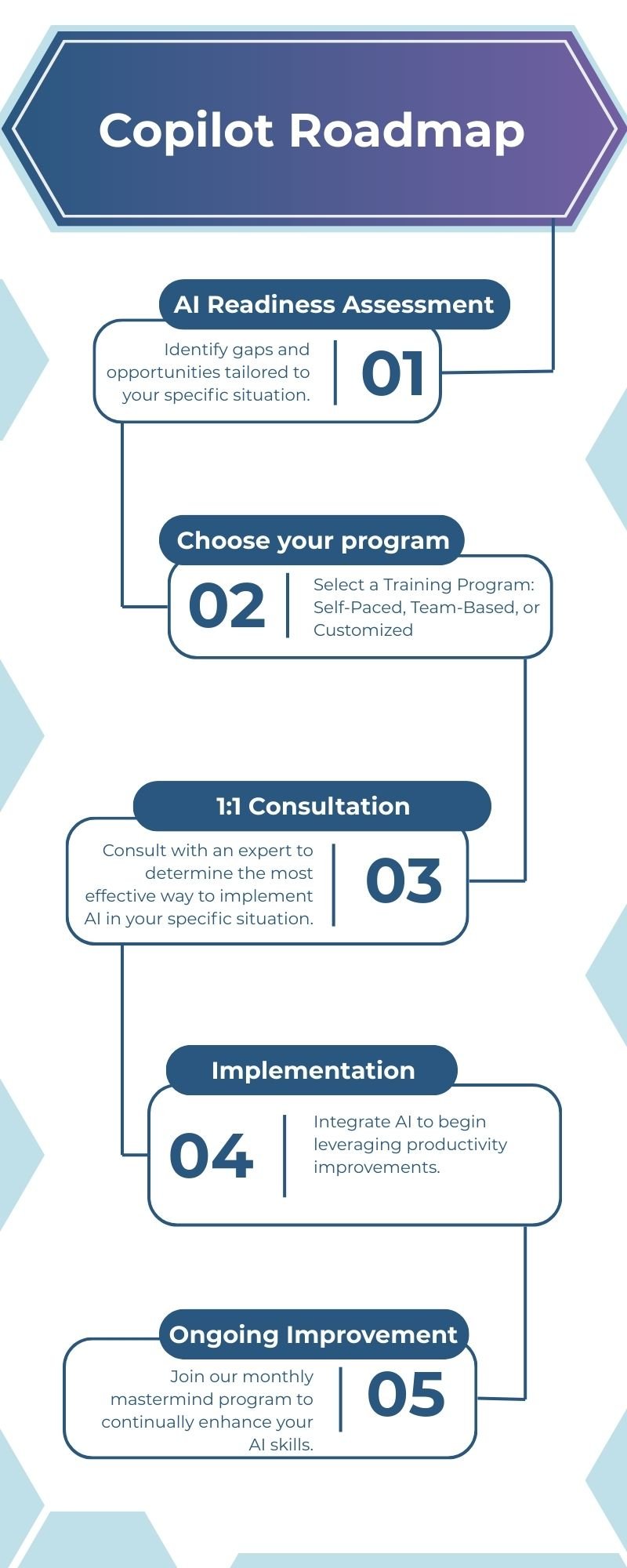
Industry-leading Copilot training with hands-on implementation and ongoing support
Free Impact Assessment
Discover where you lose the most time and shape the learning path to fit your cause and supporters.
Consultation/ Implementation Support
Access consulting and hands-on implementation support as part of the training to drive real, measurable impact.
Ongoing Copilot Updates
Stay informed about monthly Copilot updates to leverage the newest features and automation opportunities.
Training packages & Bundle
Copilot Training
Skillgine understands that non-profits must make careful budget decisions. Training needs to be useful, affordable, and connected to real outcomes.
That is why eligible non-profit organisations can receive 25% off regular Skillgine Copilot training prices.
Core Bundle
Copilot + Outlook, Word and Excel- Customized for your Not-for-Profit
- Up to three(3) trainees
- 4-hour live trainer-led training
- Free Impact Analysis
- 60-min Consultation/Implementation Support
- 30-day Email Support
- 60-day Access to the Portal
Download Course Outline
Foundational
Copilot + Outlook- Customized for your Not-for-Profit
- Up to three(3) trainees
- 2-hour live trainer-led training
- Free Impact Analysis
- 60-min Consultation/Implementation Support
- 30-day Email Support
- 60-day Access to the Portal
Download Course Outline

Meeting Bundle
Copilot+ Outlook and Teams- Customized for your Not-for-Profit
- Up to three(3) trainees
- 3-hour live trainer-led training
- Free Impact Analysis
- 60-min Consultation/Implementation Support
- 30-day Email Support
- 60-day Access to the Portal
Starting Aug 15, 2026
Download Course Outline

custom team training -plus additional support

Implementing Copilot
Across Departments
Setup, rollout, and workflow integration. Leveraging Copilot to automate tasks and maximize productivity across departments.
Copilot Mastermind
For All Learners
The Mastermind Program is your personal trainer — making sure you show up, build real skills, and get stronger every single month.

Copilot Readiness Assessment
For Executive/Managers
Identify gaps and opportunities tailored to your specific situation.
Frequently Asked Questions (F.A.Q)
What is Microsoft Copilot training for non-profits?
Microsoft Copilot training for non-profits helps staff use Copilot inside Microsoft 365 apps like Word, Excel, Outlook, Teams, and PowerPoint. The training focuses on practical work such as donor communication, funding applications, reports, meetings, and staff productivity.
How can Copilot help with donor engagement?
Copilot can help your team draft donor thank-you emails, fundraising messages, newsletters, impact updates, and follow-up communication. Your staff can then review and personalise the message before sending it.
What is the main advantage of Copilot over ChatGPT?
The primary benefit of Microsoft Copilot compared to ChatGPT is its seamless integration with Microsoft 365 applications, enabling AI-driven assistance directly within tools such as Word, Excel, and Outlook. This eliminates the need to copy, paste, or upload documents to external platforms. Additionally, Microsoft provides robust enterprise data security for all user information.
Can Copilot help with funding applications?
Yes. Copilot can help organise ideas, draft first versions, improve wording, summarise program goals, and make funding application content clearer. Your team should still review all content carefully before submission.
Is this training good for small non-profits?
Yes. Small non-profits often benefit because they have fewer staff and tighter budgets. Copilot can help reduce repetitive admin work and free up time for higher-value work.
Is the 25% discount for Microsoft licences?
No. The 25% discount is for Skillgine’s Copilot training services. Microsoft licensing and Microsoft nonprofit discounts are separate.
Do we need to be technical to attend?
No. The training is designed for non-technical users. It uses clear language, real examples, and practical tasks your team can use right away.

Our Industry Partners

Technology Partner


Training Delivery Partner
Skillgine provides Microsoft Copilot training and implementation services to businesses across Canada and the United States. We help organizations assess AI readiness, train employees, design practical workflows, develop Copilot agents, connect business applications and support long-term Copilot adoption.
COPILOT TRAINING
Copilot Training for Businesses
Copilot Training for Solopreneurs
Copilot Training for Office Professionals
Copilot Training for Non-Profits
Startup Bootcamps
Role-Based Copilot Training (Coming Soon)
Train-the-Trainer Programme (Coming Soon)
READINESS & ADOPTION
Who We Help
Small and Mid-Sized Businesses
Office Professionals
Consultants and Trainers
Non-Profit Organizations
Associations and Member Groups
Colleges and Training Providers
Startups
Sales and Customer Service Teams (Coming Soon)
Executives and Managers ( Coming Soon)
HR Managers ( Coming Soon)
Programmes & Resources
COMMUNITY
Microsoft Copilot Blog
Skillgine Copilot User Group
Copilot Adoption Academy
Skillgine Newsletter
Frequently Asked Questions (F.A.Q)
What Does Skillgine Do?
Skillgine helps organizations implement and adopt Microsoft Copilot. Services include Copilot readiness assessments, practical employee training, workflow design, Copilot implementation, custom Copilot agents, Copilot Studio solutions, MCP setup, Zoho CRM integration and ongoing adoption support.
Does Skillgine Provide Microsoft Copilot Training?
Yes. Skillgine provides practical Microsoft Copilot training for businesses, managers, office professionals, consultants, non-profits and other organizations. Training focuses on using Copilot in daily work across Microsoft 365.
Does Skillgine Integrate Copilot with Business Applications?
Yes. Skillgine provides Copilot integration services for supported business applications, including Zoho CRM. Services can include readiness review, workflow design, agent configuration, permission planning, employee training and adoption support.
What Is Skillgine’s MCP Setup Service?
Skillgine helps organizations plan and configure approved connections between AI agents and selected business systems using Model Context Protocol. The engagement can include business-workflow review, authentication requirements, access permissions, supported actions, approval requirements and user adoption.
Where Does Skillgine Provide Services?
Skillgine provides virtual Microsoft Copilot training, readiness, implementation and integration services to organizations across Canada and the United States.
Speak with a Copilot Specialist
- 1-844-904-8943
- Email Us
- Canada & USA
STAY CURRENT WITH COPILOT


By subscribing, you agree to receive Skillgine news, training updates and event information. You may unsubscribe at any time.

Copyright © 2026 skillgine | Privacy | Terms | Sitemaps | Accessibility | Refund Policy | Partner Terms | AI Ethical Use Policy
Microsoft, Microsoft 365, Microsoft Copilot and related product names are trademarks of the Microsoft group of companies. Skillgine is an independent training, implementation and adoption services provider unless otherwise stated.